
Beyond Standard Tables: Mastering Snowflake’s Dynamic and Hybrid Tables
How to eliminate pipeline spaghetti and bridge the gap between transactional and analytical workloads.

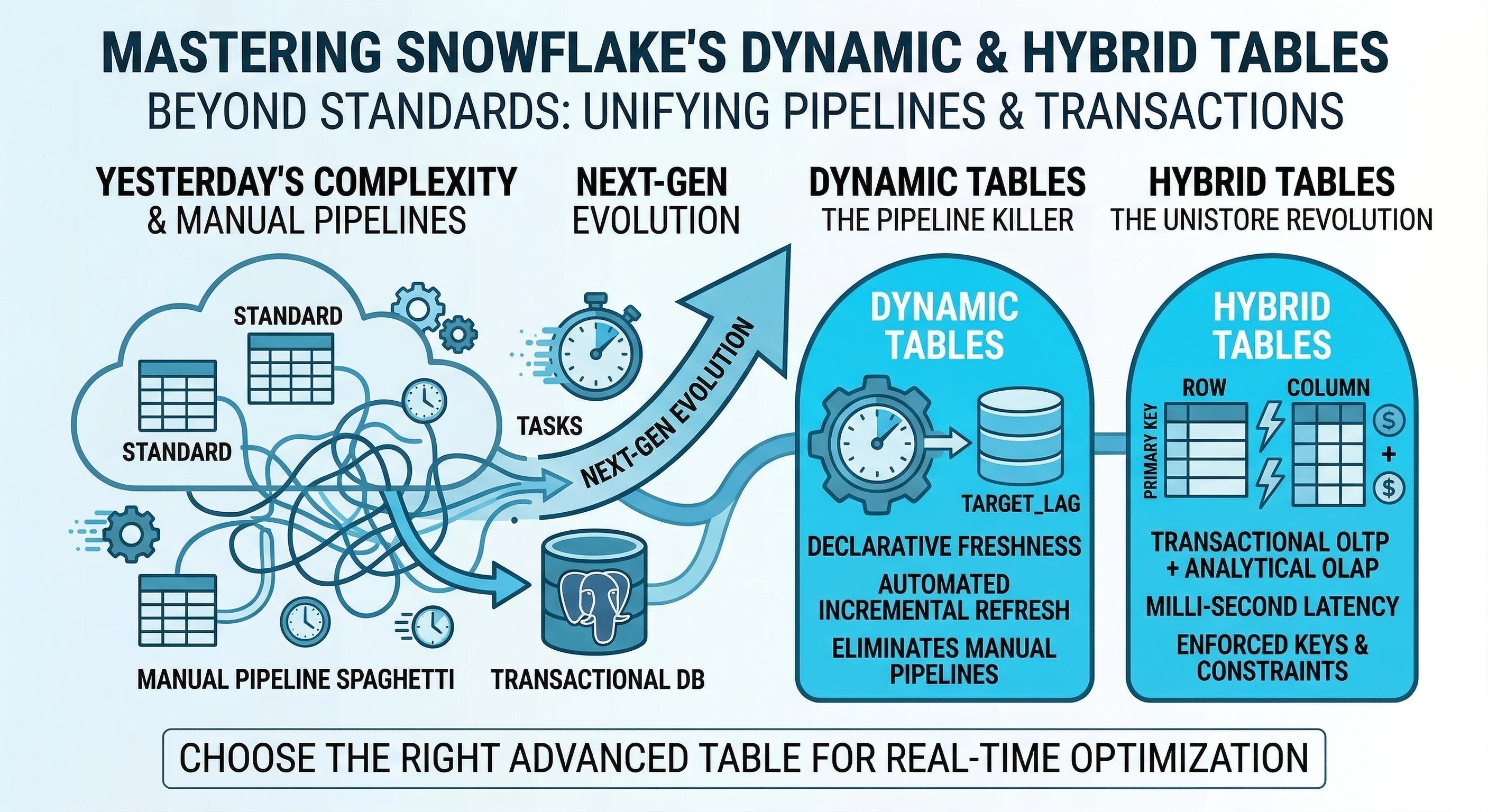
If you read our last guide on optimizing Snowflake storage (Permanent, Transient, Temporary, and External tables), you know how to manage data at rest. But modern data engineering isn’t just about storing data it’s about how that data moves and mutates.
For years, Data Engineers faced two massive headaches:
The Pipeline Headache: Managing complex webs of Airflow DAGs, Snowflake Tasks, and Streams just to keep a simple aggregated dashboard up to date.
The App Database Headache: Maintaining a strict wall between the application database (Postgres/MySQL for OLTP) and the data warehouse (Snowflake for OLAP), forcing you to build brittle ETL pipelines just to analyze yesterday’s sales.
Snowflake introduced two revolutionary table types to solve these exact problems: Dynamic Tables and Hybrid Tables.
Here is your practical guide to the “Next-Gen” of Snowflake architecture.
1. Dynamic Tables: The Pipeline Killer
Historically, if you wanted to maintain a table of “Daily Active Users” based on a raw events stream, you had to write imperative code. You had to tell Snowflake how to do the work (e.g., “Run this task every hour, check this stream for new inserts, merge them into the target table”).
Dynamic Tables flip this to a declarative model. You simply tell Snowflake what you want the table to look like and how fresh it needs to be. Snowflake’s internal engine figures out the underlying DAGs, dependencies, and incremental micro-batching.
The Catch: Dynamic tables consume compute credits in the background to maintain their freshness. If you set the lag too tight on a complex join, your warehouse will spin constantly.
When to use it:
Replacing complex Streams and Tasks.
Building Silver and Gold layer tables in your medallion architecture.
Materializing complex joins that BI dashboards query frequently.
The Implementation:
-- Creating a Dynamic Table that guarantees data is never older than 1 hour
CREATE OR REPLACE DYNAMIC TABLE gold_daily_sales
  TARGET_LAG = ‘1 hour’
  WAREHOUSE = transform_wh
AS
  SELECT
    DATE(order_timestamp) AS sale_date,
    region,
    SUM(order_amount) AS total_revenue
  FROM bronze_raw_orders
  GROUP BY DATE(order_timestamp), region;

-- Snowflake automatically manages the incremental refreshes behind the scenes!
2. Hybrid Tables: The Unistore Revolution
Snowflake is an OLAP (Online Analytical Processing) powerhouse. It loves scanning billions of rows to find an average. But historically, it was terrible at OLTP (Online Transaction Processing). If your web app needed to insert a single row or look up a single customer by their ID in milliseconds, Snowflake was the wrong tool.
Hybrid Tables (part of Snowflake’s Unistore workload) change this. They are designed for HTAP (Hybrid Transactional and Analytical Processing). They use a completely different underlying row-based storage engine combined with Snowflake’s traditional columnar engine.
The Catch: Hybrid tables enforce primary keys and foreign keys (unlike standard Snowflake tables, which allow you to define them but don’t enforce them). They are highly optimized for single-row operations, but scanning massive amounts of Hybrid table data for analytics will be slower and more expensive than scanning a standard Permanent table.
When to use it:
Serving data directly to a customer-facing web application.
Storing application state or user profiles that require high-concurrency, low-latency reads and writes.
Eliminating the need for a separate operational database (like Postgres) for lightweight applications.
The Implementation:
-- Creating a Hybrid Table requires defining and enforcing Primary Keys
CREATE HYBRID TABLE app_user_profiles (
    user_id INT PRIMARY KEY,
    username VARCHAR(50) UNIQUE,
    email VARCHAR(100),
    last_login TIMESTAMP,
    -- Secondary indexes make single-row lookups blazing fast
    INDEX idx_email (email)
);

-- Single-row inserts and point-lookups execute in milliseconds
INSERT INTO app_user_profiles (user_id, username, email, last_login)
VALUES (101, ‘data_ninja’, ‘ninja@example.com’, CURRENT_TIMESTAMP());

SELECT * FROM app_user_profiles WHERE email = ‘ninja@example.com’;
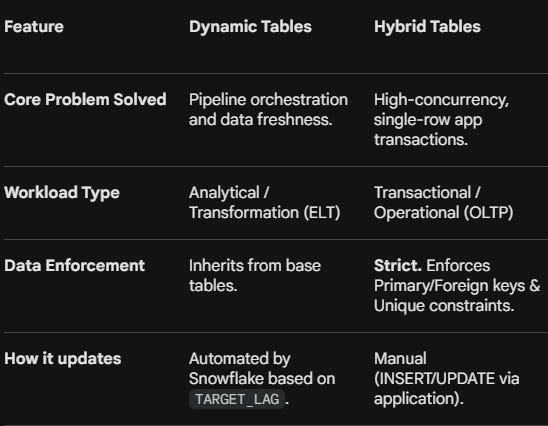
Dynamic vs. Hybrid: The Quick Comparison
While they are both advanced table types, they serve completely different purposes.
Final Checklist for Next-Gen Tables
Before reaching for these advanced tables, run your use case through this quick filter:
Are you writing complex
MERGEstatements and Airflow jobs just to keep an aggregated table updated? Drop the manual pipelines and build a Dynamic Table.Are you trying to build a lightweight web app and don’t want the overhead of setting up an RDS/Postgres database and an ETL pipeline to sync it? Build a Hybrid Table.
Are you just loading 50GB of daily logs to query once a month? Stick to the basics. Use a standard Permanent or Transient Table.